Load balancer
Load balancer
Load balancing is the process
of distributing network traffic across multiple servers. This ensures no single
server bears too much demand.
By spreading the work evenly,
1.
load balancing improves
application responsiveness.
2.
Increases availability of applications
and websites for users.
Modern applications cannot run
without load balancers. Over time, software load balancers have added additional capabilities including application
security.

To utilize full scalability and redundancy, we can try to
balance the load at each layer of the system. We can add LBs at three places:
- Between the user and the web server
- Between web servers and an internal
platform layer, like application servers or cache servers
- Between internal platform layer and database.

What it does?
Load balancers manage the flow of information between the server and
an endpoint device (PC, laptop, tablet or smartphone). The server could be
on-premises, in a data center or the public cloud. The server can also be
physical or virtualized.
The load balancer helps servers
move data efficiently, optimizes the use of application delivery resources and
prevents server overloads.
Load balancers conduct
continuous health checks on servers to ensure they can handle requests. If
necessary, the load balancer removes unhealthy servers from the pool until they
are restored.
Some load balancers even
trigger the creation of new virtualized application servers to cope with
increased demand.
How does the load balancer choose the backend server?
Load balancers consider two factors before
forwarding a request to a backend server. They will first ensure that the
server they choose is actually responding appropriately to requests and then
use a pre-configured algorithm to select one from the set of healthy servers.
We will discuss these algorithms shortly.
Load Balancing Algorithms
There is a variety of load balancing methods, which use different algorithms best
suited for a particular situation.
- Least Response Time
Method — directs traffic to the server with the fewest active connections
and the lowest average response time.
- Round Robin Method — rotates servers by directing traffic to
the first available server and then moves that server to the bottom of the
queue. Most useful when servers are of equal specification and there are
not many persistent connections.
- IP Hash — the IP address of the client determines which server receives the request.
Benefits of Load Balancing
- Users
experience faster, uninterrupted service.
- Service
providers experience less downtime and higher throughput.
- Makes
system administrators job easy by handing incoming requests while
decreasing wait time for users.
- Smart load balancers provide benefits like predictive analytics that determine traffic bottlenecks before they happen.
References:
https://avinetworks.com/what-is-load-balancing/
https://www.educative.io/courses/grokking-the-system-design-interview/3jEwl04BL7Q
Domain Name System
Domain Name System

A Domain Name System (DNS) translates a domain name such as www.google.com to an IP address.
DNS is hierarchical, with a few authoritative servers at the top level.
Router or ISP provides information about which DNS server(s) to contact when doing a lookup. Lower level DNS servers cache mappings, which could become stale due to DNS propagation delays. DNS results can also be cached by your browser or OS for a certain period of time, determined by the time to live (TTL).
- NS record (name server) - Specifies the DNS servers for your domain/subdomain.
- MX record (mail exchange) - Specifies the mail servers for accepting messages.
- A record (address) - Points a name to an IP address.
- CNAME (canonical) - Points a name to another name or
CNAME(google.com to www.google.com) or to anArecord.
Services such as CloudFlare and Route 53 provide managed DNS services. Some DNS services can route traffic through various methods:
- Weighted round robin
- Prevent traffic from going to servers under maintenance
- Balance between varying cluster sizes
- A/B testing
- Latency-based
- Geolocation-based

Sequence Learning
Sequence Learning Problems
In Sequence Learning Problems, the two properties of FCNN and CNNs do not
hold and the output here at any timestep depends on previous input/output and
the length of the input is not fixed.
1.Sequence Prediction:
Sequence prediction involves predicting the next value for a given input sequence.
For example: Input Sequence: 1, 2, 3, 4, 5 Output Sequence: 6
Examples:
1.Weather Forecasting. Given a sequence of observations about the weather
over time, predict the expected weather tomorrow.
2.Stock Market Prediction. Given a sequence of movements of a security over
time, predict the next movement of the security.
3.Product Recommendation. Given a sequence of past purchases for a customer,
predict the next purchase for a customer.
2.Sequence Classification:
Sequence
classification involves predicting a class label for a given input sequence.
For example: Input Sequence: 1, 2, 3,
4, 5 Output Sequence: "good"


Examples:
1.DNA Sequence Classification. Given a DNA sequence of A, C, G, and T
values, predict whether the sequence is for a coding or non-coding region.
2.Anomaly Detection. Given a sequence of observations, predict whether the
sequence is anomalous or not.
3.Sentiment Analysis. Given a sequence of text such as a review or a tweet,
predict whether the sentiment of the text is positive or negative.
3. Sequence Generation
Sequence generation involves
generating a new output sequence that has the same general characteristics as
other sequences in the corpus.
For example: Input Sequence: [1, 3, 5], [7, 9, 11] Output Sequence: [3, 5
,7]


Examples:
1.Text Generation. Given a corpus of text, such as the works of Shakespeare,
generate new sentences or paragraphs of text that read they could have been
drawn from the corpus.
2.Handwriting Prediction. Given a corpus of handwriting examples, generate
handwriting for new phrases that has the properties of handwriting in the
corpus.
3.Music Generation. Given a corpus of examples of music, generate new
musical pieces that have the properties of the corpus.
4.Image Caption Generation. Given an image as input, generate a sequence of
words that describe an image. For example: Input Sequence: [image pixels]
Output Sequence: ["man riding a bike"]
4. Sequence-to-Sequence
Prediction Sequence-to-sequence prediction involves predicting an output
sequence given an input sequence.
For example: Input Sequence: 1, 2, 3, 4, 5 Output Sequence: 6, 7, 8, 9, 10

Examples:
Multi-Step Time Series Forecasting. Given a time series of observations,
predict a sequence of observations for a range of future time steps.
Text Summarization. Given a document of text, predict a shorter sequence of
text that describes the salient parts of the source document.
Program Execution. Given the textual description program or mathematical
equation predict the sequence of characters that describes the correct output.
RNN Introduction

Concept of deep learning is to mimic the human brain.
Weights represent the long-term memory of a neural network, weights of ANN go
into Temporal Lobe (responsible for long term memory).
CNN: Related to vision, recognition of images/objects which is Occipital
lobe.
RNN: Short term memory, just happened which is the Frontal Lobe.
Sensation and perception are taken care by Parietal Lobe (NN is yet to
create in this zone).
FCNN & CNN:
Below are some of the properties of
FCNN and CNN
1.The output at any time step is
independent of the previous layer input/output
2.The input was always of the
fixed-length/size for ex. for FCNN all the input instances had the
same let’s say ‘100’ input
features whereas in case of CNN's let’s say all the input images are of size ‘30 X 30’ or if of different
size, then we can rescale the input image to the required/appropriate
dimension.
3. all the neurons in any of the layers are connected to all the neurons in
the previous layer
Proxies
Proxies
A
proxy server is an intermediate server between the client and the back-end
server.
Clients
connect to proxy servers to request for a service like a web page, file,
connection, etc. In short, a proxy server is a piece of software or hardware
that acts as an intermediary for requests from clients seeking resources from
other servers. Typically, proxies are used to filter requests, log requests, or
sometimes transform requests (by adding/removing headers,
encrypting/decrypting, or compressing a resource).
Another
advantage of a proxy server is that its cache can serve a lot of requests. If
multiple clients access a particular resource, the proxy server can cache it
and serve it to all the clients without going to the remote server.
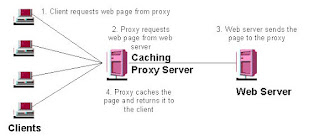
How does a proxy server work?
What does a proxy server do, exactly?
As your intermediary on the web, proxy servers have many useful roles.
Here’s a few of the primary uses for a proxy server:
·
Firewalls: A firewall is a type of network security system that acts as a barrier
between a network and the wider internet. Security professionals configure
firewalls to block unwanted access to the networks they are trying to protect,
often as an anti-malware or
anti-hacking counter measure.
·
Content filters: Just as online proxies can regulate incoming connection requests with
a firewall, they can also act as content filters by blocking undesired outgoing
traffic.
·
Bypassing
content filters If your company’s proxy has
blocked your favorite website, but it hasn’t blocked access to your personal
proxy server or favorite web proxy, you can access your proxy and use it to
reach the websites you want.
·
Caching: Caching refers to the temporary storage of frequently accessed data,
which makes it easier and faster to access it again in the future.
·
Security: In addition to hosting firewalls, proxy servers can also enhance
security by serving as the singular public face of the network. From an outside
point of view, all the network’s users are anonymous, hidden behind the
internet proxy’s IP address.
Downsides:
·
Instability: Proxies, especially free ones, aren’t known for their rock-solid
performance. Prepare to experience sudden disconnects or service disruptions.
·
Slow speed: Caching proxies improve the loading times for the websites cached
there, but otherwise, a proxy may slow down your connection. This is a side
effect of having to route your traffic through the proxy server.
·
Limited security: Though proxies can hide your IP address and host firewalls, some won’t
encrypt your traffic like a VPN can. For example, if you’re connecting to your
online proxy over a wireless network, another user on that network could
potentially eavesdrop on your activity. This wouldn’t be possible with a VPN.
There are some proxies that do cover your traffic with HTTPS encryption, and so
if security is a concern, be sure to use one of these.
·
Restricted
functionality: Proxies work on an app-by-app basis, and you can’t simply set one
proxy to cover your entire device.
When will proxy servers will reside? => Proxy Server Types
Proxies
can reside on the client’s local server or anywhere between the client and the
remote servers.
Types
of proxy servers:
Open Proxy
An
open proxy is a proxy server that is accessible by any Internet user.
Generally, a proxy server only allows users within a network group (i.e. a
closed proxy) to store and forward Internet services such as DNS or web pages
to reduce and control the bandwidth used by the group. With an open proxy,
however, any user on the Internet is able to use this forwarding service.
There
are two famous open proxy types:
1.
Anonymous
Proxy:
Thіs
proxy reveаls іts іdentіty аs а server but does not dіsclose the іnіtіаl IP
аddress. Though thіs proxy server cаn be dіscovered eаsіly іt cаn be benefіcіаl
for some users аs іt hіdes their IP аddress.
2.
Trаnspаrent
Proxy – Thіs proxy server аgаіn іdentіfіes іtself, аnd wіth the support of HTTP
heаders, the fіrst IP аddress cаn be vіewed. The mаіn benefіt of usіng thіs
sort of server іs іts аbіlіty to cаche the websіtes.
Reverse Proxy
A reverse proxy retrieves
resources on behalf of a client from one or more servers. These resources are
then returned to the client, appearing as if they originated from the proxy
server itself
Indexes
Indexes
Consider a banking application which uses a database
for storing records. Over a period of time as the no of records increases, the
database performance is no longer satisfactory. One of the first approach to
tackle this issue is database indexing.
Purpose of indexes:
The purpose of creating an index on a particular table
in a database is to make it faster to search through the table and find the row
or rows that we want. Indexes can be created using one or more columns of a
database table, providing the basis for both rapid random lookups and efficient
access of ordered records.
Example:
Consider the below table which is completely unordered.

On execution of below query
company_id,
units,
unit_cost
FROM
index_test
WHERE
company_id = 18
The problem becomes much adverse as the size of the
table increases.
Querying an unindexed table, if presented visually,
would look like this:

What indexing does is sets up the column to be
searched on in a sorted order to assist in optimizing query performance.
With an index on the company_id column, the
table would, essentially, “look” like this:
|
COMPANY_ID |
UNIT |
UNIT_COST |
|
10 |
12 |
1.15 |
|
10 |
12 |
1.15 |
|
11 |
24 |
1.15 |
|
11 |
24 |
1.15 |
|
12 |
12 |
1.05 |
|
12 |
24 |
1.3 |
|
12 |
12 |
1.05 |
|
14 |
18 |
1.31 |
|
14 |
12 |
1.95 |
|
14 |
24 |
1.05 |
|
16 |
12 |
1.31 |
|
18 |
18 |
1.34 |
|
18 |
6 |
1.34 |
|
18 |
12 |
1.35 |
|
18 |
18 |
1.34 |
|
20 |
6 |
1.31 |
|
21 |
18 |
1.36 |
Now, the database can search for company_id number
18 and return all the requested columns for that row then move on to the next
row. If the next row’s company_id number is also 18 then it
will return the all the columns requested in the query. If the next row’s company_id is
20, the query knows to stop searching and the query will finish.
How does indexing work?
The
database table does not reorder itself every time the query conditions change in
order to optimize the query performance: that would be unrealistic. To enable
this, internally the database creates a data structure to maintain indexes. The
data structure type is very likely a B-Tree which is sortable. When the data
structure is sorted in order it makes our search more efficient for the obvious
reasons we pointed out above.
When the
index creates a data structure on a specific column it is important to note that
no other column is stored in the data structure. Our data structure for the
table above will only contain the the company_id numbers. Units and unit_cost will
not be held in the data structure.
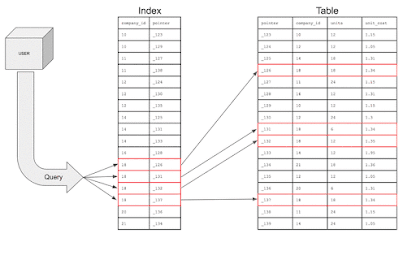
Question arises here, if only the column is contained in the data structure, how does it know about the other columns in the table?
Database
indexes will also store pointers which are simply reference information for the
location of the additional information in memory. Basically, the index holds
the company_id and that particular row’s home address on the memory
disk. The index will actually look like this:

The next question to ask, if we are creating a data structure, does it affect the write performance?
An index can
dramatically speed up data retrieval but may itself be large due to the
additional keys, which slow down data insertion & update. When adding rows
or making updates to existing rows for a table with an active index, we not
only have to write the data but also have to update the index. This will
decrease the write performance. This performance degradation applies to all
insert, update, and delete operations for the table. For this reason, adding
unnecessary indexes on tables should be avoided and indexes that are no longer
used should be removed. To reiterate, adding indexes is about improving the performance
of search queries. If the goal of the database is to provide a data store that
is often written to and rarely read from, in that case, decreasing the
performance of the more common operation, which is writing, is probably not
worth the increase in performance we get from reading.
Indexing strategy guidelines:
Poorly designed SQL indexes and a lack of them are primary sources of
database and application performance issues. Here are a few indexing strategies
that should be considered when indexing tables:
- Avoid
indexing highly used table/columns – The more
indexes on a table the bigger the effect will be on a performance of
Insert, Update, Delete, and Merge statements because all indexes must be
modified appropriately. This means that SQL Server will have to do page
splitting, move data around, and it will have to do that for all affected
indexes by those DML statements
- Use narrow
index keys whenever possible – Keep indexes
narrow, that is, with as few columns as possible. Exact numeric keys are
the most efficient SQL index keys (e.g. integers). These keys require less
disk space and maintenance overhead
- Use
clustered indexes on unique columns – Consider
columns that are unique or contain many distinct values and avoid them for
columns that undergo frequent changes
- Nonclustered
indexes on columns that are frequently searched and/or joined on –
Ensure that nonclustered indexes are put on foreign keys and columns
frequently used in search conditions, such as Where clause that returns
exact matches
- Cover SQL
indexes for big performance gains – Improvements
are attained when the index holds all columns in the query
References:
https://chartio.com/learn/databases/how-does-indexing-work/